Documentation
HQTUI builds terminal applications in TypeScript, Rust, Go, Python and Zig, with a new native C++ ten-screen demo over the shared C rendering core. The C++ library API remains experimental. Ruby, PHP, Perl and Nim now have experimental bindings to the same native engine.
Choose a language
Rust, Go, Python, Zig and C++ demos need no JavaScript runtime. Both the vanilla and mise commands below fetch latest main before running. They work from any directory and never switch branches, reset, or pull in your checkout. All dashboard commands launch ten-screen demos. Live metrics in the native demos currently require Linux; use --sim for generated sample data on other platforms. The native demos and bindings use the TypeScript reference's ten screen layouts, including its responsive dashboard, detailed telemetry tabs and widget showcases. Each port is checked against 120 shared TypeScript reference frames across four terminal sizes and three themes. Live-data availability still depends on the host and permissions; full cross-platform collection and interaction parity is not claimed. Use 1–9 / 0 or Tab to change screens and q to quit. Headless screenshots work without a TTY. Zig requires version 0.16.
C++ requires a C++17 compiler (GCC or Clang) and CMake 3.20+. Its mise command supplies pinned CMake; you still need your platform's C/C++ build tools. The interactive C++ terminal supports Linux/macOS; live collection and exact 120-frame parity are currently tested on Linux. The C-only demo and languages beyond those listed here are not ready yet.
Ruby, PHP, Perl and Nim are bindings, not independent renderer ports. Their widget APIs submit batched scene updates; the shared ten-screen demo, collectors and terminal loop execute inside the calling runtime. They need GCC/Clang, and Ruby, PHP and Perl also need CMake. Ruby needs Fiddle; Perl needs FFI::Platypus (the launcher installs it into its private cache using cpanm if missing). PHP uses a small native adapter built with matching php-config/development headers, or FFI when available. Nim compiles the engine into the program from source and needs Nim 2.2.4 or newer. Mise supplies pinned Ruby/Perl/Nim, prebuilt PHP via its Conda backend, and CMake. No system packages or global gems/CPAN modules are installed by the launcher.
Linux sensor panels now collect available hwmon temperatures, fans, voltage, current and power, plus CPU clocks (including the /proc/cpuinfo fallback for VMs), battery and NVIDIA readings. Traffic and Sessions read socket breakdowns, login/failed-login history, SSH events and readable HTTP access logs. Protocol/direction labels are port-based estimates; HTTP request rates are estimated from log growth. No active sessions or unreadable logs can legitimately leave a panel empty. These demos do not request elevated privileges or invent real-mode data.
Vanilla commands require Git, curl and the language's installed toolchain (Bun for TypeScript), at least as new as the version that revision pins; the launcher compares the two before building and names both if yours is older. The misealternatives install/use the selected pinned runtime and required build tools without loading project hooks. The launcher prints the full Git revision, reuses completed builds for that revision, and fails rather than silently launching stale code if fetching fails. First builds take longer. Append --sim or --snapshot directly; no extra Cargo/Zig separator is needed.
These commands execute our launcher script; review it first if needed. Sources/builds live under $XDG_CACHE_HOME/hqtui-demo (or ~/.cache/hqtui-demo), not your project. Native interactive runs need Linux/macOS terminals.
Ruby
Ruby bindings with a batched widget API. The shared C/C++ demo engine runs inside your language runtime; not an independent port.
Interactive dashboard
curl -fsSL https://hqtui.com/demo.sh | sh -s -- --system ruby
With mise
curl -fsSL https://hqtui.com/demo.sh | sh -s -- --mise ruby
Headless screenshot · no terminal required
curl -fsSL https://hqtui.com/demo.sh | sh -s -- --system ruby --snapshot
PHP
PHP bindings with a batched widget API. The shared C/C++ demo engine runs inside your language runtime; not an independent port.
Interactive dashboard
curl -fsSL https://hqtui.com/demo.sh | sh -s -- --system php
With mise
curl -fsSL https://hqtui.com/demo.sh | sh -s -- --mise php
Headless screenshot · no terminal required
curl -fsSL https://hqtui.com/demo.sh | sh -s -- --system php --snapshot
Perl
Perl bindings with a batched widget API. The shared C/C++ demo engine runs inside your language runtime; not an independent port.
Interactive dashboard
curl -fsSL https://hqtui.com/demo.sh | sh -s -- --system perl
With mise
curl -fsSL https://hqtui.com/demo.sh | sh -s -- --mise perl
Headless screenshot · no terminal required
curl -fsSL https://hqtui.com/demo.sh | sh -s -- --system perl --snapshot
Nim
Nim bindings with a batched widget API. The shared C/C++ demo engine runs inside your language runtime; not an independent port.
Install the library
nimble install https://github.com/profullstack/hqtui?subdir=ports/nim
Interactive dashboard
curl -fsSL https://hqtui.com/demo.sh | sh -s -- --system nim
With mise
curl -fsSL https://hqtui.com/demo.sh | sh -s -- --mise nim
Headless screenshot · no terminal required
curl -fsSL https://hqtui.com/demo.sh | sh -s -- --system nim --snapshot
C++
Native C++17 demo over the shared C renderer. Experimental library API; requires GCC/Clang and CMake.
Interactive dashboard
curl -fsSL https://hqtui.com/demo.sh | sh -s -- --system cpp
With mise
curl -fsSL https://hqtui.com/demo.sh | sh -s -- --mise cpp
Headless screenshot · no terminal required
curl -fsSL https://hqtui.com/demo.sh | sh -s -- --system cpp --snapshot
Rust
Native Rust with explicit ownership and interaction IDs.
Interactive dashboard
curl -fsSL https://hqtui.com/demo.sh | sh -s -- --system rust
With mise
curl -fsSL https://hqtui.com/demo.sh | sh -s -- --mise rust
Headless screenshot · no terminal required
curl -fsSL https://hqtui.com/demo.sh | sh -s -- --system rust --snapshot
Go
Native Go with callbacks that close over your application state.
Interactive dashboard
curl -fsSL https://hqtui.com/demo.sh | sh -s -- --system go
With mise
curl -fsSL https://hqtui.com/demo.sh | sh -s -- --mise go
Headless screenshot · no terminal required
curl -fsSL https://hqtui.com/demo.sh | sh -s -- --system go --snapshot
Python
Native Python with callbacks and compact array-backed cell storage.
Interactive dashboard
curl -fsSL https://hqtui.com/demo.sh | sh -s -- --system python
With mise
curl -fsSL https://hqtui.com/demo.sh | sh -s -- --mise python
Headless screenshot · no terminal required
curl -fsSL https://hqtui.com/demo.sh | sh -s -- --system python --snapshot
Zig
Native Zig 0.16 with explicit context and arena-managed frames.
Interactive dashboard
curl -fsSL https://hqtui.com/demo.sh | sh -s -- --system zig
With mise
curl -fsSL https://hqtui.com/demo.sh | sh -s -- --mise zig
Headless screenshot · no terminal required
curl -fsSL https://hqtui.com/demo.sh | sh -s -- --system zig --snapshot
For development only, you can still clone the monorepo and use its local commands; those do not auto-update:
git clone https://github.com/profullstack/hqtui
In an updated checkout, mise run demo:cpp updates before running (likewise demo:rust, demo:go, demo:python, demo:zig and demo:typescript). Use demo-local:cpp and the other demo-local tasks to work on your local edits without updating.
Read how the ports share a conformance corpus. The API guide below describes the TypeScript reference implementation.
Install TypeScript
Try the full ten-screen demo with simulated data, without creating an app:
curl -fsSL https://hqtui.com/demo.sh | sh -s -- --system typescript --sim
curl -fsSL https://hqtui.com/demo.sh | sh -s -- --mise typescript --sim
Omit --sim to use real system metrics. To build your own app, install the library:
bun add @profullstack/hqtui   # Bun is the default runtime
npm  add @profullstack/hqtui   # Node 22.6+ works unchanged
There is also a CLI: hqtui doctor reports what your terminal actually supports, and hqtui opens a built-in showcase. Install it in one line (into ~/.local, no sudo; fetches a private Node if you have no Node 22+):
curl -fsSL https://hqtui.com/install.sh | sh
Your first app
Everything has a default. createApp() sets up the dark theme, truecolor with automatic 256/16-colour fallback, mouse tracking, the alternate screen, resize handling and adaptive frame pacing — and it restores your terminal on Ctrl+C, SIGTERM, or an uncaught exception.
import { createApp } from "@profullstack/hqtui";

const app = await createApp();

app.render(({ ui }) => {
  ui.panel({ title: "Hello" }, (panel) => {
    panel.text("Hello, terminal.");
    panel.label("Press q to quit.");
  });
});

await app.start();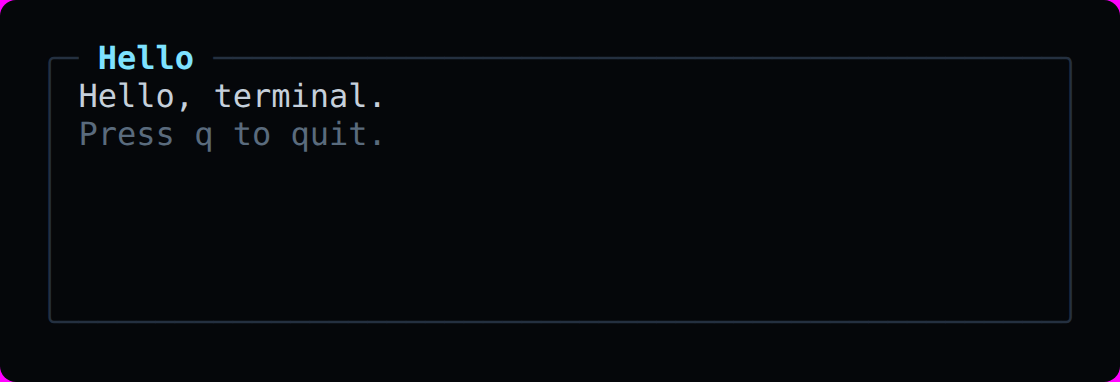
The render callback runs on every frame. Keep it pure: read your state, describe the screen, and let the renderer work out what actually changed. Call app.invalidate() when your data changes and the scheduler coalesces repeated calls into one frame.
Layout
Containers collect their children first and solve the layout once, which is why "1fr" works without a retained tree. Sizes may be a number of cells, a percentage, a fraction, auto, or fill, each with optional min and max.
ui.grid({ columns: ["2fr", "1fr"], rows: [14, "1fr"], gap: 1 }, (grid) => {
  grid.panel({ title: "CPU" });
  grid.panel({ title: "Memory" });
  grid.panel({ title: "Processes", colSpan: 2 });
});

ui.row({ gap: 1 }, (row) => {
  row.panel({ width: 30 });          // fixed
  row.panel({ width: "40%" });       // percentage
  row.panel({ width: "2fr", min: 20 }); // fraction with a floor
});
Adjacent panels each draw their own border by default. Turn on collapseBorders and neighbours share one, the way CSS collapses table borders. It is a whole-screen setting because it changes the layout rather than only the glyphs: two panels overlap by the column their borders share, and the corners where they meet become junctions. It applies to panels only, so a table pressed against a panel edge keeps its own shape. Press c in any demo to see it.
const app = createApp({ collapseBorders: true });
app.setCollapseBorders(!app.collapseBorders);   // or toggle it while running

// ╭─ CPU ────────┬─ Memory ─────╮   instead of   ╭─ CPU ────────╮╭─ Memory ─────╮
// │ all █████ 62%│ used ██▏  31%│                │ all █████ 62%││ used ██▏  31%│
// ╰──────────────┴──────────────╯                ╰──────────────╯╰──────────────╯
Responsive layouts pick a branch by the width actually available, so the same view works in a 60-column pane and a 240-column window.
ui.responsive({
  150: (wide) => wide.row({ gap: 1 }, (r) => { /* four columns */ }),
  100: (medium) => medium.row({ gap: 1 }, (r) => { /* three columns */ }),
  0: (compact) => compact.column({}, (c) => { /* stacked */ }),
});
Widgets
Every widget is a method on the container, sized by the same layout engine and themed by the same tokens. Panels, tables, trees, log viewers, key/value lists, meters, gauges, donuts, progress bars, sparklines, line and area graphs, histograms, heat bars, tabs, status bars, buttons, checkboxes, toggles, radios, selects, text inputs, modals, command palettes, tooltips, badges and dividers.
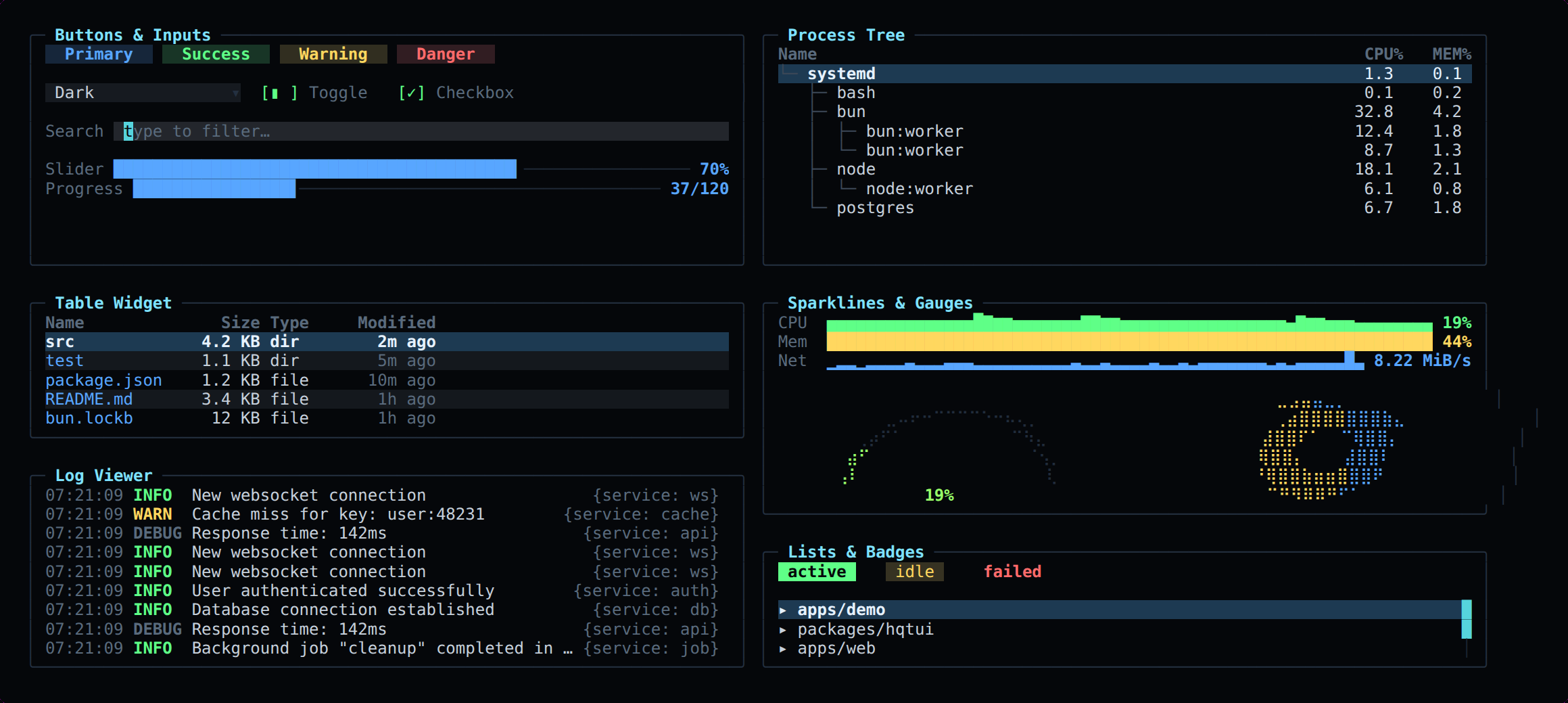
p.table({
  rows: processes,
  selected: 3,
  offset,
  scrollbar: true,
  zebra: true,
  columns: [
    { key: "pid", title: "PID", width: 7, align: "right" },
    { key: "name", title: "Name", color: theme.primary },
    { key: "cpu", title: "CPU%", width: 6, align: "right",
      color: (row) => heatColor(theme, row.cpu / 100) },
  ],
});
Graphics
Unicode Braille gives every cell a 2×4 pixel matrix, so a 40×10 panel plots at 80×40 resolution. When the terminal cannot render Braille, the same call degrades to block elements and then to ASCII.
p.graph({ values: cpu, min: 0, max: 100, fill: true });        // braille
p.graph({ values: cpu, mode: "block", colors: theme.heat });   // block elements
p.graph({ values: cpu, mode: "ascii" });                       // last resort

p.multiGraph([
  { values: read,  color: theme.success, label: "read" },
  { values: write, color: theme.secondary, label: "write" },
], { legend: true, axis: true });
Graphs scale to the window that is actually drawn, not the whole history buffer, so an old spike never flattens the live line.
Themes
Nine themes ship in the box and the dark one is the default. A theme is a flat set of tokens; override any of them with defineTheme().
import { createApp, themes, defineTheme, hex } from "@profullstack/hqtui";

const brand = defineTheme({
  name: "brand",
  primary: hex("#7c5cff"),
  success: hex("#22d3a5"),
  graph: [hex("#7c5cff"), hex("#22d3a5"), hex("#ffb020")],
});

const app = await createApp({ theme: brand });
app.setTheme(themes.nord); // switch at runtime
Icons
The OpenIcon pack is built in and on by default: 370 icons, from mail and git-branch to github and bluesky. Each has three glyphs, and icon() returns the best one this terminal can draw: a Nerd Font glyph, a Unicode symbol, or ASCII. Aliases work too, so icon("email") is icon("mail").
import { icon, setIconMode } from "@profullstack/hqtui";
ui.text(`${icon("mail")} Inbox ${icon("git-branch")} main`);
// Inbox main with a Nerd Font
// ✉ Inbox ⎇ main in a UTF-8 terminal
// @ Inbox Y main anywhere else
icon("github", { mode: "ascii" }); // "gh", for this call only
setIconMode("nerd"); // for the whole appA Nerd Font cannot be detected from inside a terminal, so it is never assumed. Set NERD_FONT=1, or OPENICON_GLYPHS=nerd|unicode|ascii, or call setIconMode(). Otherwise you get Unicode where the terminal draws it and ASCII where it does not. An icon Nerd Fonts has no glyph for falls back to Unicode, and an unknown name draws nothing. Swap in another OpenIcon set with useIconPack(iconPackFrom(json)). The Rust, Go and Python ports carry the same table: icon("mail"), hqtui.Icon("mail"), hqtui.icon("mail").
Emoji
The OpenEmoji pack is built in and on by default: every standard emoji, 3,963 in Emoji 18.0, with its CLDR name, an oe_ shortcode and search keywords. emoji() is the emoji where the terminal draws emoji and readable text where it cannot: an emoticon where one fits, the name in brackets elsewhere.
import { emoji, emojify, emojiSearch, setEmojiMode } from "@profullstack/hqtui";

ui.text(`${emoji("rocket")} shipped`);   // 🚀 shipped     [rocket] shipped as text
ui.text(emojify("deploy :tada: :+1:"));   // deploy 🎉 👍    deploy [party popper] +1
emoji("thumbs_up_t3");                     // 👍🏽  skin tones are _t1 … _t5
emojiSearch("lol")[0].char;                // 😂  CLDR keywords
setEmojiMode("text");                      // or HQTUI_EMOJI=emoji|text
A name can be the shortcode (fire, oe_fire, :fire:), the CLDR name, a common alias (thumbsup, +1) or the emoji itself. stringWidth counts every emoji as two columns, skin tones, flags, keycaps and ZWJ sequences included, so tables and borders stay aligned in every port.
Our artwork in your terminal. A TUI cannot pick the terminal's font, so hqtui fonts install installs the OpenEmoji colour font and makes it the emoji fallback: fontconfig on Linux (Alacritty, foot, GNOME Terminal and Konsole follow it; Kitty and WezTerm get a one-line snippet) and ~/Library/Fonts on macOS, where Kitty, WezTerm and iTerm2 can use it and Terminal.app cannot. hqtui fonts status checks it; hqtui fonts remove undoes it. Nothing is installed except by that command.
Inline artwork. With HQTUI_EMOJI_ART=1, await emojiImage("rocket") draws the OpenEmoji PNG two cells wide in Kitty and Ghostty (Kitty graphics) and iTerm2 and WezTerm (inline images), picking 128, 256 or 512 px at twice the cell height, and falls back to the character everywhere else. In a browser terminal, load openemoji.css from the set and add OpenEmoji to xterm.js's fontFamily.
HD images inside your app. createImageStore() uploads each OpenEmoji or OpenIcon PNG once as a Kitty Unicode-placeholder image, and drawRichText() / drawIcon() draw them as ordinary cells, so redraws, scrolling and tmux keep them. WezTerm and iTerm2 get inline images drawn after each frame (images.attach(app)). Over SSH or in tmux (with allow-passthrough on) set HQTUI_IMAGES=1 (Kitty/Ghostty) or HQTUI_IMAGES=wezterm. Everywhere else it draws the text.
Input
Keys arrive normalized — "ctrl+c", "up", "f5", "shift+tab" — never as escape sequences. Mouse press, release, drag, move and scroll are decoded from SGR reporting, bracketed paste arrives as one event, and Tab traversal works without wiring anything up.
app.on("key", (event) => {
  if (event.key === "ctrl+k") openPalette();
  if (event.name === "down") selected++;
});

app.on("mouse", (event) => {
  if (event.action === "scroll") offset += event.scroll;
});

// Or let the widgets answer: the row under a click, the key under a click,
// the button under a click. A double-click arrives as clicks: 2.
ui.table({ rows, onSelectRow: select, onActivateRow: open });
ui.statusBar({ items: [{ key: "F1", label: "Help", onPress: showHelp }] });
ui.modal({ title: "Delete?", onDismiss: close,
           buttons: [{ label: "Yes", onPress: confirm }] });

// Controls that take an action join the Tab order automatically.
p.button({ label: "Restart", onPress: () => restart() });
Testing
The headless renderer draws into an in-memory framebuffer with no TTY, no PTY and no escape sequences, then gives you the text, the ANSI, the HTML, or the raw cell grid with per-cell colours and attributes.
import { renderToScreen, renderToText } from "@profullstack/hqtui";

const screen = renderToScreen(({ ui }) => dashboard(ui, state), {
  width: 120,
  height: 40,
});

expect(screen.contains("CPU")).toBe(true);
expect(screen.find("bun")).toEqual({ x: 10, y: 4 });
expect(screen.cell(0, 4).bg).toBe(theme.selection);
expect(renderToText(view, { width: 40, height: 10 })).toMatchSnapshot();
renderToHtml() emits the same frame as HTML instead of ANSI — the same renderer and the same output, which is what makes a rendered frame reviewable in a browser or a pull request.
Escape hatches
Nothing is off limits. Draw straight onto the surface you were given, or take a Braille canvas and blit it yourself.
p.draw((surface) => {
  surface.text(0, 0, "raw access", { fg: theme.accent });
  surface.fillRect(0, 1, surface.width, 1, { bg: theme.selection });
});

p.canvas((canvas) => {
  canvas.circle(canvas.width / 2, canvas.height / 2, 12);
  canvas.line(0, 0, canvas.width, canvas.height);
});
Performance
The screen is four typed arrays; nothing allocates per cell in a hot path. Frames are diffed and only changed runs are written, merged across short clean gaps because rewriting five cells costs less than the escape sequence to skip them. A terminal pen-state cache means no redundant SGR is ever emitted.
# 160x50 (8,000 cells), bun 1.4, linux x64
renderer.frame.unchanged     0.068ms      no output
renderer.frame.1pct          0.140ms      627 bytes/frame
renderer.frame.10pct         0.291ms      2,639 bytes/frame
renderer.frame.100pct        1.409ms      8,341 bytes/frame
widgets.dashboard            0.425ms      6 panels
Compatibility
Tier 1: Linux TTY, SSH, tmux, Kitty, WezTerm, Ghostty, Alacritty, GNOME Terminal, Konsole, macOS Terminal, iTerm2 and Windows Terminal. Capability detection covers truecolor, Unicode, Braille, mouse, synchronized output, bracketed paste and focus events, and every one can be overridden by option or environment variable.
NO_COLOR is honoured, colours quantize automatically to 256 or 16, Braille falls back to blocks and then ASCII, and frame rate drops to 15 fps over SSH.
Full API reference in the repository, and the original product requirements are in docs/PRD.md. Questions and bugs: open an issue.